JavaScript Fundamentals: Arrays

I am a web developer from Balochistan and a blog writter.
Introduction to Arrays.
Arrays are a crucial part of JavaScript programming which provides powers to the developer to store and manipulate multiple values within a single variable. Which saves time for developers to work with different types of data at the same time. In this blog, we will cover the fundamentals of arrays and get to know more about them.
What is an Array in JavaScript?
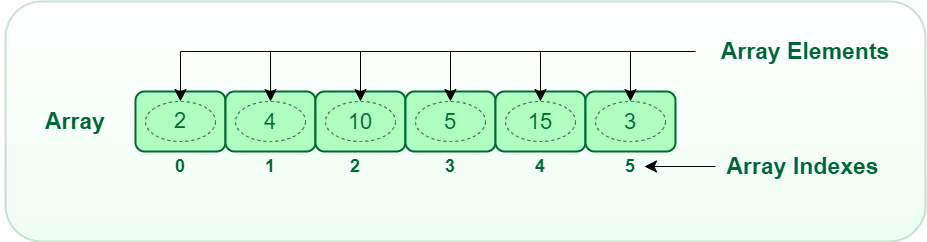
Arrays in JavaScript are like a container that can hold multiple types of data arranged by specific indexes and we can access them using their indexes.
Declaration and Initialization of Arrays
To get the benefits of Arrays, we first need to declare and initialize them. We can use arrays using Array literal syntax or the Array construction function.
Using Array literal Syntax, we can declare an empty array as
let myArray = []
// We can also declare initializing an array with values
let myArray = [1 , 2, , 3, 4, 5];
Using the Array construction function to create an array.
let myArray =  new Array() // This will create an empty array
// We can pass values at the time of initialization like
let myArray = new Array(1 , 2 , 3 , 4 , 5);
Accessing and manipulating Array Elements
When we declare and initialize our Arrays we need to access them for using them in our code to do various operations on them which makes our code effective. We can access the array of elements by various techniques and methods.
Accessing Array Elements by index
In Arrays each element is assigned an index starting from 0 for the first element and so on. To access a specific element we specify its index with square brackets following the array variable name. For example, we have an array named myArray , we can access its first element as myArray[0].
let myArray = [1 , 2 , 3 , 4 , 5];
console.log(myArray[0]);
// Output: 1
// To access the second element
console.log(myArray[1]);
// Output: 2
Modifying Array Elements using indexes
Arrays in JavaScript are mutable, which means we can modify their elements. To modify a value of an element we assign a new value to the corresponding index. For example, we want to modify the second element in the myArray , we can use the following syntax:
myArray[1] = 4;
let myArray = [1 , 2 , 3 , 4 , 5];
myArray[1] = 4; // Previous value was 2 , modified value is 4
console.log(myArray);
// Output: [1 , 4 , 3 , 4 , 5]
Adding and Removing Array Elements
JavaScript provides several methods to add and remove array elements.
To elements at the end of an array, we can use push() method. This method appends one or more elements to the end of an array, like:
myArray.push(newElement)
let myArray = [1 , 2 , 3 , 4 , 5];
myArray.push(6);
console.log(myArray);
// Output: [1 , 2 , 3 , 4 , 5 , 6];
To remove an element from the end of an array we use the pop() method. It removes the last element of an array and decreases the array length by 1.
like : myArray.pop();
let myArray = [1 , 2 , 3 , 4 , 5];
myArray.pop();
console.log(myArray);
// Output: [1 , 2 , 3, 4];
Conclusion
Every JavaScript developer must have an understanding of arrays as they are powerful tools for managing and manipulating multiple values within a single variable. Throughout this blog, we delved into the essentials of the array, its definition, declaration, and various methods for accessing and manipulating their elements. There are many more to come for arrays as the most important topics are remaining like the popular array methods and many more, which we will explore in my future blogs, It's for this one hope to continue the journey of exploring javascript.


